Tutorial 48

1. Introduction
Welcome to Tutorial 48 of the Practical AI for Retirees series!
In previous tutorials, we built distinct AI assistants to help with specialized areas of your life—such as managing personal finances (Tutorial 39), planning trips (Tutorial 41), keeping home routines smooth (Tutorial 42), and launching small projects (Tutorial 44).
While using individual assistants is powerful, the real magic happens when you connect them. A Multi-Agent Workflow simply means taking the output from one specialized agent and passing it directly into another. By chaining your AI tools together, you can seamlessly turn complex multi-step tasks—like budgeting, scheduling, and executing a big vacation or home project—into a smooth, automated routine without repeating yourself.
2. Setting Up Your Master Workflow Director Agent
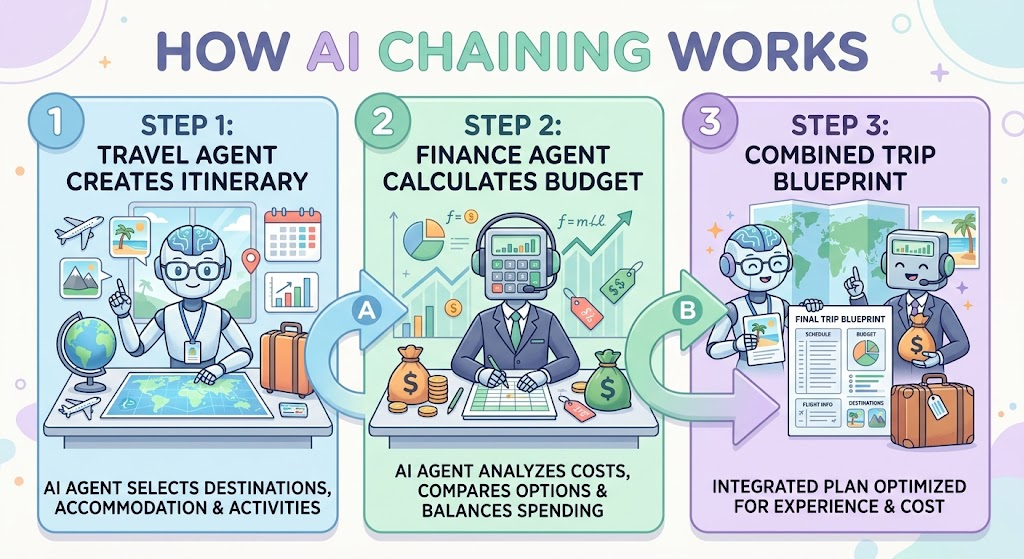
To run multi-agent workflows effectively, you can set up a Master Director Agent that knows how to orchestrate your specialized assistants.
Master Setup Prompt
Copy and paste this prompt into your AI tool (ChatGPT, Claude, or Gemini) to activate your Orchestrator:
“You are my AI Workflow Orchestrator & Multi-Agent Director. Your primary job is to coordinate tasks across my specialized AI personas (e.g., Financial Assistant, Travel Companion, Household Manager, and Hobby Mentor).
Please follow these guidelines:
- When given a complex goal, break it down into sequential sub-tasks assigned to the appropriate specialized agent.
- Pass outputs smoothly from Step A to Step B so I don’t have to re-type background information.
- Present combined results, timelines, and budgets using structured Markdown tables.
- Keep explanations simple, practical, and low-stress.
- End major responses with 1 immediate step where I can review or approve the combined plan.”
3. Practical Applications & Real-World Examples
Example 1: The Auto-Budgeted Vacation (Travel Companion + Finance Assistant)
Instead of planning a trip in a vacuum and checking your wallet later, chain your Travel Companion (Tutorial 41) and Finance Assistant (Tutorial 39) together.
Workflow Prompt:
“Act first as my Travel Companion and draft a 4-day itinerary for a relaxed trip to Savannah, Georgia focused on historic tours and good food. Then, pass that itinerary to my Finance Assistant to build an itemized budget table with estimated costs for lodging, dining, tours, and a 10% contingency cushion.”
| Workflow Step | Active Agent | Task Performed | Output Generated |
| Step 1 | Travel Companion | Generates 4-day Savannah itinerary with daily pace limits | Sightseeing schedule & restaurant ideas |
| Step 2 | Finance Assistant | Analyzes itinerary against realistic price ranges | Itemized trip budget table with safety margin |
| Step 3 | Workflow Director | Combines schedule & costs into a master plan | Final approved trip blueprint |
Example 2: The Event Planner (Household Manager + Side Business Assistant)
Chain your Household Manager (Tutorial 42) with your Side Business Assistant (Tutorial 44) to host a local workshop or craft sale.
Workflow Prompt:
“Act as my Business Assistant to draft a 3-step promotional announcement for a local woodworking workshop. Once written, pass those details to my Household Manager to generate a prep checklist and schedule for hosting 4 attendees in my garage workshop.”
4. Supplemental Collateral Package
Quick Win
Copy and paste this quick chaining prompt into your AI model:
“Act as my Health & Vitality Coach to suggest 3 easy daily stretching routines. Then, act as my Household Manager and integrate those 3 routines into a simple morning daily schedule starting at 8:00 AM.”
Matt’s Tip
Think of your AI agents as a team of specialists at a round table. You don’t need to open separate chat windows or software programs. Simply tell your AI in plain language: “First, use my Finance Assistant persona to figure out $X, then pass that number to my Travel Companion persona to build the plan.” Let the AI do the heavy lifting of carrying context from step to step!
