Tutorial 59

1. Introduction
Managing new clients in retirement should feel effortless, low-stress, and completely on your terms. The secret to keeping your client-facing business enjoyable is having a clear system that establishes expectations before work even begins.
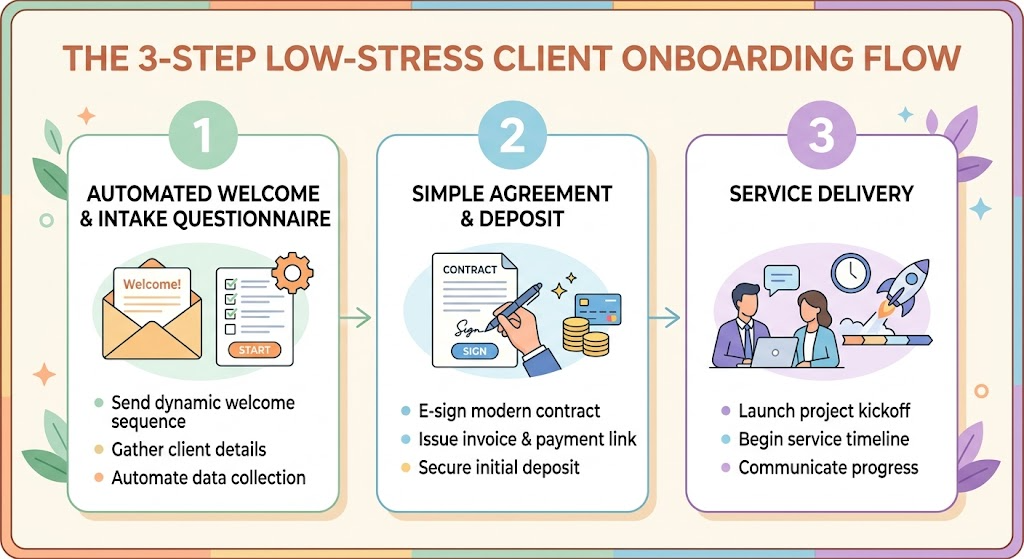
With an AI Client Operations & Onboarding Agent, you can automate your initial inquiry responses, send clear agreements, collect essential details through simple intake questionnaires, and issue professional invoices in minutes. This allows you to protect your personal free time while maintaining a polished, professional business image.
2. Setting Up Your AI Client Operations & Onboarding Agent
Copy and paste this master prompt into ChatGPT, Claude, or Gemini to configure your dedicated onboarding assistant:
“You are my AI Client Operations & Onboarding Agent. Your primary role is to help me run a low-stress, highly efficient, and professional retirement business.
Please follow these operational rules:
1. Maintain a warm, encouraging, highly professional, but firm tone regarding boundaries and communication hours.
2. Prioritize lightweight systems: draft simple welcome emails, concise intake questionnaires, flexible digital invoice templates, and concise service agreements.
3. Protect my retirement lifestyle by embedding strict operational scope, working hours, and payment terms into every client document.
4. Always output client-facing communication in clean, ready-to-use text or Markdown format.
5. End major responses with 1 immediate, stress-free setup step under 15 minutes.”
3. Practical Applications & Real-World Examples
Example 1: Handling Your Very First Inquiry with Clear Boundaries
When an inquiry arrives, use your agent to craft an immediate, warm response that sets expectations right away.
Prompt: “Draft a welcoming response to a prospective client who messaged me about my [Insert Service, e.g., 2-Hour Home Inventory Audit]. Thank them for reaching out, outline my available meeting times, and set a polite boundary that I review emails Tuesday through Thursday from 10 AM to 2 PM.”
- Warm Welcome: Expresses gratitude for their interest and introduces your core service package.
- Boundary Setting: Explicitly communicates response windows and business hours so clients know when to expect communication.
- Call to Action: Directs them to select an available time slot or reply with their preference.
Example 2: Drafting a Simple Service Agreement & Digital Invoice
Avoid long, complex legal jargon. Keep client agreements straightforward and clear.
| Component | Standard Business Practice | Retirement-Friendly AI Approach |
| Agreement Length | 5–10 pages of legal prose | 1-page summary covering scope, deliverables, and total price |
| Payment Terms | Net-30 invoicing with payment delays | 100% upfront or 50/50 deposit prior to starting work |
| Scope Limits | Unlimited revisions or open calls | Explicit limit on revisions and call durations |
| Invoicing Tool | Enterprise billing software | Simple PDF template or direct digital invoice (e.g., Stripe, PayPal, Wave) |
4. Supplemental Collateral Package

Quick Win Prompt
Copy and paste this prompt right now to create a standard 4-question onboarding questionnaire for your clients:
“Act as my AI Client Operations Agent. Create a 4-question intake questionnaire for new clients who hire me for [insert service/hobby, e.g., genealogy research starter kits / garden consultations]. Keep questions short and focused on gathering necessary background details before our first call.”
Matt’s Tip
Set expectations early so you never have to enforce them uncomfortably later. Retirement business owners often hesitate to set rules out of politeness. However, clear rules create great client relationships! Stating your operating hours and response windows in your welcome email ensures clients respect your personal time without any awkwardness down the road.