Tutorial 55

1. Introduction
Welcome to Tutorial 55 of the Practical AI for Retirees series! While earlier tutorials covered basic business concepts and consulting setups (Tutorial 44), this guide focuses on building a complete online presence to generate additional income in retirement.
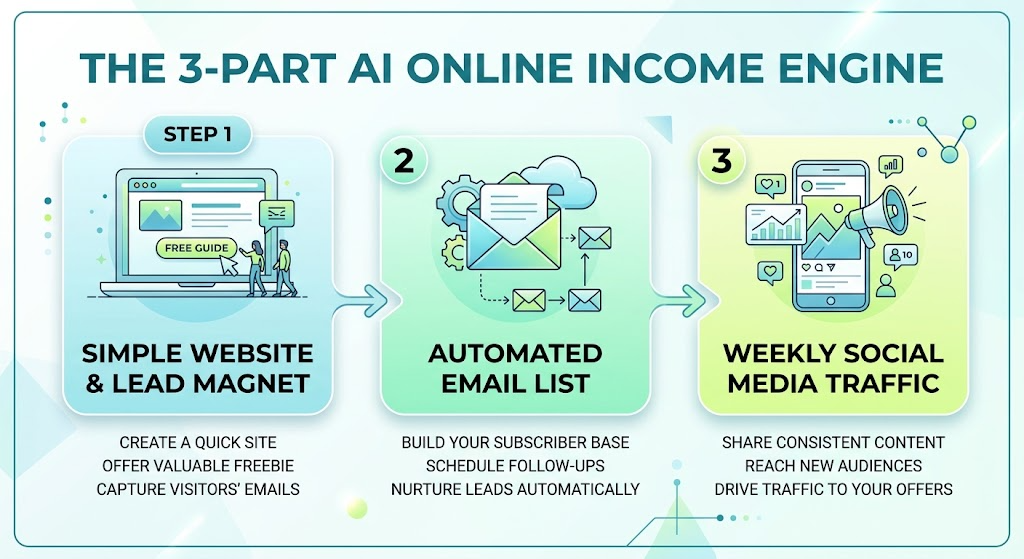
Using AI, you can design a full-featured website, launch an email newsletter list, and automate daily social media posts—all without needing technical web development skills, marketing expertise, or high overhead costs. Your AI Online Business Assistant handles copy drafting, site structure, content calendars, and audience growth strategies so you can focus on sharing your expertise and earning supplementary income.
2. Setting Up Your AI Online Business Assistant
Copy and paste this master setup prompt into your preferred AI tool (ChatGPT, Claude, or Gemini) to configure your online business co-pilot:
You are my AI Digital Business & Marketing Assistant. Your role is to help me build, launch, and markYou are my AI Digital Business & Marketing Assistant. Your role is to help me build, launch, and market a low-stress online business designed for additional income in retirement.
Please follow these guidelines:
1. Provide step-by-step instructions for website creation, email list setup, and social media marketing using low-cost, beginner-friendly tools.
2. Structure all content calendars, site architectures, and email sequences in clean Markdown tables.
3. Write copy that is clear, engaging, and professional without using aggressive high-pressure sales jargon.
4. Keep workflows low-effort, prioritizing automation and simple weekly routines that require no more than 3-5 hours per week.
5. End major responses with 1 immediate, actionable task I can complete today in under 15 minutes.
6. Set a low-stress online business designed for additional income in retirement.
3. Practical Applications & Real-World Examples
Example 1: Designing a Website Structure & Homepage Copy
Ask your AI to create a clear layout for a simple 3-page website (Home, About, Services/Products) to showcase your offerings.
Prompt: “I am launching an online site offering curated vintage woodworking guides and custom digital project plans. Draft the page structure and the main headline and section text for my homepage.”
| Website Section | Purpose & Content | Call-to-Action (CTA) |
| Hero Banner | Headline: “Timeless Woodworking Projects Made Simple” Subheadline: “Step-by-step digital plans built on 40 years of craftsmanship experience.” | “Download Free Starter Plan” (Captures Email) |
| About / Credibility | Brief bio highlighting decades of experience, passion for teaching, and commitment to accessible woodworking. | “Read My Story” |
| Featured Products | Showcase 3 core digital guides/plans with pricing and simple feature lists. | “View Catalog” |
| Email Sign-Up | Lead Magnet offer: Free PDF guide on “5 Essential Workshop Tools Every Beginner Needs.” | “Get the Free Guide” |
Example 2: Building an Automated Email Lead Magnet & Welcome Sequence
An email list is the most reliable way to connect directly with potential customers. Use AI to draft a 3-part welcome sequence for new subscribers.
Prompt: “Draft a 3-part automated email welcome sequence for people who subscribe to my newsletter to download my free woodworking guide. Keep each email under 150 words and friendly.”
- Email 1 (Immediate): Delivers the free download link and warmly introduces the mission of the website.
- Email 2 (Day 3): Shares 1 core tip or common mistake to avoid, building trust and authority.
- Email 3 (Day 7): Introduces your primary digital product or consulting package with a gentle call-to-action.
Example 3: Generating a 5-Day Social Media Content Calendar
Use AI to generate daily social media posts (for platforms like Facebook, Pinterest, or LinkedIn) to drive traffic to your website and email list.
Prompt: “Create a 5-day social media post calendar promoting my digital plans. Include post copy, recommended post types, and relevant hashtags.”
| Day | Content Angle | Social Media Copy Excerpt | Visual / Asset |
| Monday | Tip of the Week | “Before you start sanding your next project, remember this rule: always move with the grain, never across…” | Workshop photo |
| Wednesday | Behind the Scenes | “Working on a new digital blueprint for a classic garden bench today! Here is a sneak peek at the sketch…” | Sketch / WIP photo |
| Friday | Product Spotlight | “Want to build your own sturdy workbench over the weekend? Grab our complete digital guide today…” | Finished Bench photo |

4. Supplemental Collateral Package
Quick Win
Copy and paste this prompt right now to define your online business concept:
“I want to earn additional income online using my background or interest in [insert skill/hobby, e.g., baking, gardening, bookkeeping, history]. Give me 3 digital product ideas (e.g., eBooks, guides, templates) I can sell on a simple website, along with a lead magnet idea to build an email list.”
Matt’s Tip
Build your system once, then let automation do the heavy lifting. The key to earning extra income online in retirement without creating stress is to set up simple, low-maintenance systems. Use easy website platforms (like Wix or Squarespace) paired with email platforms (like MailerLite or ConvertKit). Spend 1 hour on Monday using AI to draft all your social media posts for the week, schedule them, and spend the rest of your time enjoying your retirement!